How to get more viewers on TikTok LIVE
Getting viewers into your stream is one job, keeping them there is another. Here are 15 proven methods for both.
First, understand how it works
TikTok shows live streams in the For You feed, in the LIVE tab and to followers through notifications. There is no single magic setting that gets a stream shown to more people; but it is widely known that engagement signals matter, such as how long viewers stay, whether they comment, whether they send likes and gifts, and whether they share the stream. In short: anything that keeps viewers on your stream and gets them talking brings in new viewers.
We have split the methods below into three groups: before the stream, in the first minutes and throughout the stream.
Before the stream
- Pick a fixed streaming timeCertain days of the week, at a set time. Loyal viewers need to be able to plan around you. Evenings in your audience's time zone are usually busy, but the best time is whenever your own audience is active.
- Announce the stream in advancePost a short video a few hours before you go live: "Halay night at 9 pm tonight, who will lead?" The video carries viewers over to your stream.
- Write your title like an invitationInstead of "Chatting", try "Comment to drop into the arena! Last one standing wins". The title should tell a viewer scrolling the LIVE feed why they should stop.
- Fix your picture and soundVertical video, good lighting, clear audio. Viewers deciding at scrolling speed do not stop for a blurry stream.
In the first minutes
- Have something moving on screenA viewer who joins should see something in the first second. An empty room and "waiting for everyone to arrive" is the fastest way to lose them. An interactive game fills the screen from the very start.
- Tell them what to do"Comment to join the halay." One sentence, one action. Viewers stay when they know what to do.
- Greet everyone who arrivesWelcome your first ten viewers by name. Early arrivals become the core of your stream.
Throughout the stream
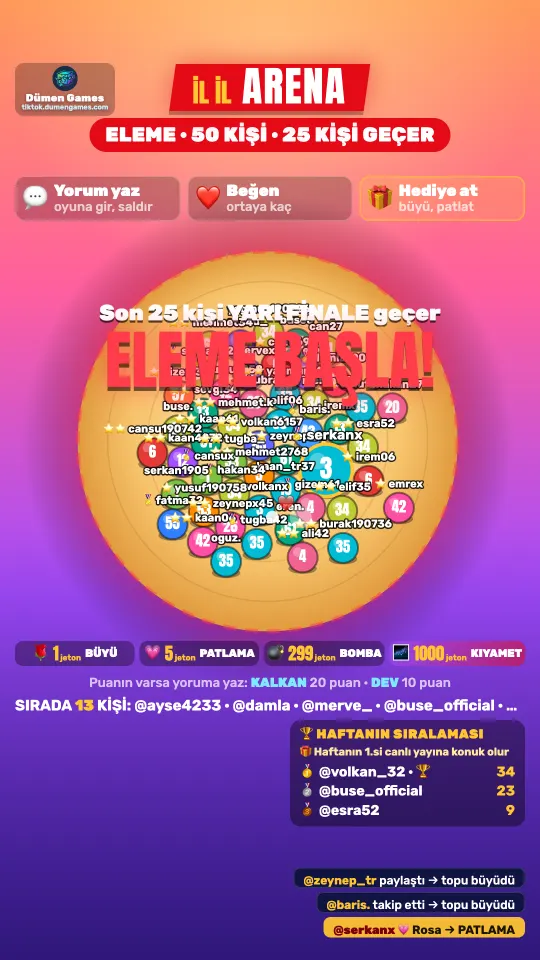
- Turn spectators into playersViewers stay longer on a stream where they see their own name on screen and have their own ball, soldier or halay dancer. That is what interactive live stream games are for.
- Create a "next moment""The final is starting", "last set", "the wall is about to fall". Viewers do not want to leave before they see the result.
- Ask questions people can answer in the comments"Where are you from?", "Which team?", "A or B?" Easy questions bring comments, and comments push your stream forward.
- Make likes countGive likes a visible effect on screen: the halay speeds up, the ball dodges to the center, the army charges. A visible effect brings more likes.
- Ask viewers to shareA game-related call like "Bring a friend, make your team stronger" works better than a dry "please share".
- Stream for longerGetting noticed in the LIVE feed takes time. The first half hour is usually a warm-up; one-to-two-hour streams reach more new viewers.
- Build a communityA weekly leaderboard, ranks, the week's winner joining as a guest. What brings viewers back to your next stream is the place they earned on the last one.
- Collaborate with other streamersJoint streams and PK battles introduce two communities to each other. Naming the Tug of War teams after the two streamers is a fun way to start.
Mistakes that drive viewers away
| Mistake | Why it hurts | Instead |
|---|---|---|
| Long silences | New viewers see an empty stream and scroll on | The game screen and announcer keep the stream going; you chat in between too |
| Constantly asking for gifts | Wears viewers out and turns your stream into a sales pitch | Play up the fun moments and leave the gifts to the game |
| Not reading comments | Viewers who comment feel ignored | Read names and reply |
| Irregular streaming times | Loyal viewers cannot catch your stream | A fixed weekly schedule |
| Short, choppy streams | No time to get noticed in the feed | Fewer but longer streams |
Add a game to your stream
Try the games that keep viewers watching, for free.
Frequently asked questions
Why do I get so few viewers on TikTok LIVE?
The most common reasons: irregular streaming times, a screen that does not grab attention in the first second, an unclear title, long silences and short streams. Anything that keeps viewers on your stream and gets them talking helps your stream get shown to more people.
What is the best time to go live on TikTok?
Evenings in your audience's time zone are usually busy. But the best time is whenever your own audience is active; you can check your followers' active hours in TikTok analytics.
How long should a live stream be?
The first half hour is usually a warm-up. Streams of one to two hours work better for getting noticed in the feed and letting your community warm up.
Do interactive games increase viewer numbers?
Games increase comment counts and how long viewers stay; these are signals that help a stream get shown to more people. Results vary by stream and audience.
I have few followers. Should I still go live?
Yes. A small but active community is a good start. Games that need no gifts, like Quiz Battle, make for a lively stream even with few viewers.
Does buying viewers work?
No. Fake viewers do not comment or stay on your stream; they drag down the engagement signals that push your stream forward and put your account at risk.